卡西卡的小寶庫
寶庫寶庫寶庫
Showing posts with label C#. Show all posts

C#產生動畫GIF

Posted In: , , . By 卡西卡

CodeProject: NGif, Animated GIF Encoder for .NET

優點:影像品質佳
缺點:速度較慢
Photobucket
Gif.Components.AnimatedGifEncoder e = new Gif.Components.AnimatedGifEncoder();
e.Start(@"c:\test.gif");
e.SetDelay(500);
//-1:no repeat,0:always repeat
e.SetRepeat(0);
for (int i = 0 ; i < 12; i++ )
{
    e.AddFrame( Image.FromFile( string.Format(@"F:\Downloads\map({0}).png", i) ) );
} // for
e.Finish();

HOWTO: create an animated GIF using .Net (C#) - Rick van den Bosch - Blog
優點:速度快,檔案小
缺點:影像品質較差,Microsoft GIF Animator及Adobe ImageReady CS2判定格式錯誤無法開啟(但IE和FF正常)。
Photobucket


其它資料:


Customers.aspx
=AJAX, 向web service請求資料。
[script]
function displayCustomers(result) {
$get("customers").innerHTML = result;
}
[script]

[body]
<asp:ScriptManager ID="ScriptManager1" runat="server" >
<Services>
<asp:ServiceReference Path="~/CustomerService.asmx" />
</Services>
</asp:ScriptManager>

Enter Country: <input id="Country" type="text" />
<a href="javascript:CustomerService.GetCustomersByCountry($get('Country').value, displayCustomers)">Show Customers</a>
<div id="customers"></div>
[/body]

CustomerService.cs
=這個AJAX用的web service是宣告 System.Web.Script.Services.ScriptService
using System;
using System.Web;
using System.Collections;
using System.Web.Services;
using System.Web.Services.Protocols;

[WebService(Namespace = "http://tempuri.org/")]
[WebServiceBinding(ConformsTo = WsiProfiles.BasicProfile1_1)]
[System.Web.Script.Services.ScriptService]
public class CustomerService : System.Web.Services.WebService {

[WebMethod]
public string GetCustomersByCountry(string country)
{
NorthwindTableAdapters.CustomersTableAdapter customersAdapter = new NorthwindTableAdapters.CustomersTableAdapter();
Northwind.CustomersDataTable customers = customersAdapter.GetCustomersByCountry(country);

if (customers.Rows.Count > 0)
return ViewManager.RenderView("~/App_Views/Customers.ascx", customers);
else
return ViewManager.RenderView("~/App_Views/NoCustomers.ascx", null);
}
}

Customers.ascx.cs
=View
using System;

public partial class App_Views_Customers : System.Web.UI.UserControl
{
public object Data;

protected void Page_Load(object sender, EventArgs e)
{
Repeater1.DataSource = Data;
Repeater1.DataBind();
}
}

ViewManager.cs
=Controller
using System;
using System.Web;
using System.Web.UI;
using System.IO;
using System.Reflection;

public class ViewManager
{
public static string RenderView(string path)
{
return RenderView(path, null);
}

public static string RenderView(string path, object data)
{
Page pageHolder = new Page();
UserControl viewControl = (UserControl) pageHolder.LoadControl(path);

if (data != null)
{
Type viewControlType = viewControl.GetType();
FieldInfo field = viewControlType.GetField("Data");

if (field != null)
{
field.SetValue(viewControl, data);
}
else
{
throw new Exception("View file: " + path + " does not have a public Data property");
}
}

pageHolder.Controls.Add(viewControl);

StringWriter output = new StringWriter();
HttpContext.Current.Server.Execute(pageHolder, output, false);

return output.ToString();
}
}


ASP.NET 1.1 只能用在.aspx上
StringWriter output = new StringWriter();
HttpContext.Current.Server.Execute("~/ajax.aspx", output);
return output.ToString();

參考資料:


取得 IP, Hostname

Posted In: , , , . By 卡西卡

根據IP地址獲得主機名稱
// .NET 1.1 ~
System.Net.IPHostEntry host = System.Net.Dns.GetHostByAddress("192.168.0.1"); // [msdn]
Console.WriteLine(host.HostName);

// .NET 2.0 ~
System.Net.IPHostEntry host = System.Net.Dns.GetHostEntry("192.168.0.1"); // [msdn]
Console.WriteLine(host.HostName);

取得本機IP
static void Main(string[] args)
{
  // 顯示主機名
  string hostname = Dns.GetHostName();
  Console.WriteLine("hostname = {0}", hostname);

  // 顯示每個IP地址
  IPHostEntry hostent = Dns.GetHostByName(hostname); // 主機信息
  IPAddress[] addrs = hostent.AddressList; // IP地址數組
  foreach ( IPAddress ip in hostent.AddressList )
  {
    Console.WriteLine("Address: {0}", ip);
  } // foreach
}
 

VB, VBA


MD5加密

Posted In: , . By 卡西卡


Base64 編解碼

Posted In: , , , , . By 卡西卡

C#

VB, VBA - 中文不支援


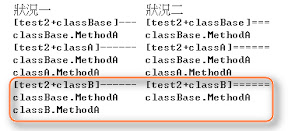
狀況1:轉成BaseClass時的差異

  • 使用obj2.MethodA時,是呼叫classB的MethodA
  • 使用classBase存取物件時,用new的classB是呼叫classBase的MethodA!

狀況2:三層繼承時

  • 編譯時,classC.MethodA會發生錯誤:「標記為 override 的成員 'ConsoleApplication1.test1.classC.MethodA()' 不能標記為 new 或 virtual」

狀況3:介面(interface)

狀況4:自訂屬性(Custom Attributes)

狀況5:泛型(Generic)


  • abstract [msdn]
    • 抽象類別
      • 抽象類別不能執行個體化。
      • 抽象類別可能會包含抽象方法和存取子。
      • 抽象類別不可能使用 sealed修飾詞來進行修改,這表示此類別不能繼承。
      • 衍生自抽象類別的非抽象類別必須包含所有繼承的抽象方法和存取子之實作。
    • 抽象方法、抽象屬性
      • 抽象方法宣告只允許在抽象類別裡。
      • 因為抽象方法宣告沒有提供實際的實作,因此並沒有方法主體,方法宣告僅以分號做為結束而且簽章 (Signature) 之後沒有大括號 ({ })。例如:
        public abstract void MyMethod();
      • 抽象方法宣告中使用 static 或 virtual 修飾詞是錯誤的。
    • 在靜態屬性上使用 abstract 修飾詞是錯誤的。
    • 可在衍生類別中覆寫抽象繼承屬性,方式是包含使用 override 修飾詞的屬性宣告。
  • virtual [msdn]
    • 不能與 static、abstract, private 或 override 等修飾詞一起使用
    • 在靜態屬性上使用 virtual 修飾詞是錯誤的
  • override [msdn]
    • 提供繼承自基底類別的成員新實作
    • 被覆寫的基底方法必須是 virtual、abstract 或 override
    • 不能變更 virtual 方法的存取範圍。override 方法和 virtual 方法都必須有相同的存取層級修飾詞。
    • 不能使用 new、static、virtual 或 abstract 等修飾詞修改 override 方法
  • new [msdn]
    • 當 new 關鍵字做為修飾詞時,會明確隱藏繼承自基底類別的成員。
    • 同時使用 new 和 override 會發生錯誤,因為這兩個修飾詞在意義上是互斥的。override 為繼承的成員擴充實作 (Implementation) 時,使用 new 可建立具有相同名稱的新成員,並將原來的成員隱藏起來。

參考資料:


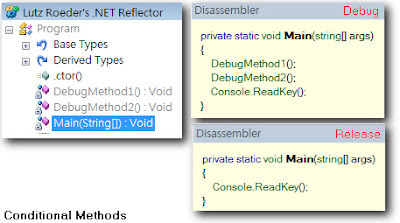
Conditional Methods

Posted In: . By 卡西卡

效果:用 [Conditional("DEBUG")] 較佳

參考資料: